
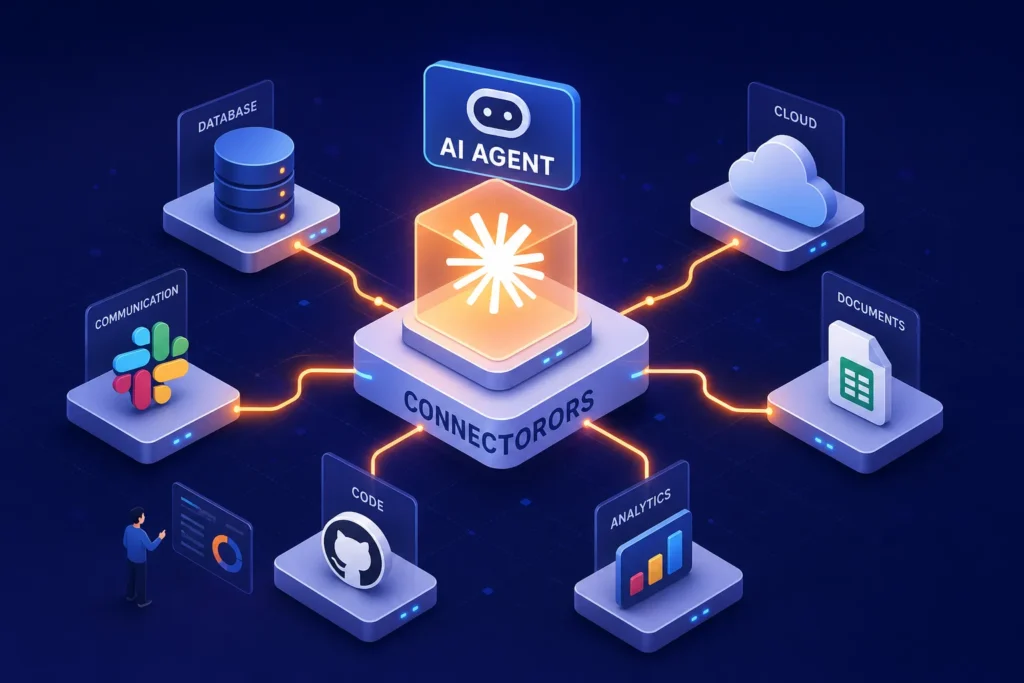
Many users treat Claude the way they treat a search engine: type a question, read the answer, copy what is useful, and move on. It is a reasonable habit. But it treats one of the most capable AI systems ever built like a very articulate encyclopaedia. Enabling Claude connectors changes that entirely, transforming the assistant from a passive responder into an active participant in your actual workflows, with live access to the tools and data your work depends on.
Claude’s integration architecture, built around a growing directory of verified connections to external tools and data sources, is what makes that shift possible. It can check your live ad performance data via a connector such as Windsor.ai to inform budget recommendations, pull a document from your knowledge base mid-conversation, and send a Slack message, summarise a Zoom call, or query a connected analytics platform, all within a single conversation. Using Claude connectors moves it from a different category of answer engine into a genuinely different category of work tool.
This article covers how these Claude integrations work, what is available, how to enable them securely, and which combinations genuinely move the needle for marketing, content, and operational teams.
What Claude connectors are and why they change how AI works
A Claude connector is a verified integration that allows Claude to communicate with an external service in real time. It can read data from that service, write to it, or trigger actions within it. Every connector is built on an open standard called the Model Context Protocol (MCP), developed by Anthropic to give AI agents a consistent way to communicate with external tools. The MCP specification and Anthropic’s connector directory are publicly documented at claude.com/connectors for teams that want to verify the technical details.
From question-answering to action-taking
When Claude only had access to its training data, it was fundamentally reactive. You brought the context to it. Claude connectors reverse that dynamic. Claude can now check your Google Calendar before scheduling a meeting, pull a live Shopify report before recommending a budget decision, or read a Notion document mid-conversation. The assistant stops being a consultant you brief from scratch every session and starts behaving like a well-informed colleague who already has context before you open your mouth.
The Model Context Protocol: the bridge beneath the hood
MCP is the open protocol that standardises how AI agents communicate with external tools and data sources. Every Claude connector is, at its core, an MCP server, what you might think of as Claude MCP connectors working under a shared technical standard. Think of it the way you think about USB-C: one standard, many devices. This matters because developers can build once and Claude can interact with hundreds of different services using the same underlying language. As of mid-2026, MCP is also the standard adopted by other major AI platforms, which means a single MCP server can work across multiple AI clients simultaneously.
How data actually flows when a connector is active
Caution about connecting business tools to an AI assistant is reasonable, fear of data leakage or credential exposure is a legitimate concern. Understanding the actual data flow tends to resolve most of that concern, or at least point you toward the right questions to ask.
The path from your request to the connected service
When you send a query that involves a connected service, Claude identifies the relevant tool, the MCP service sends an on-demand request to the connected platform on your behalf, data is returned and used to generate a response, and then the session is cleaned up. Anthropic does not continuously poll connected services or maintain persistent background access. Each request creates a fresh, on-demand data pull. It is worth noting, however, that Anthropic does retain encrypted OAuth tokens to enable future on-demand requests, this is distinct from any ongoing background access to your accounts, and is governed by your plan’s consent settings. This is materially different from granting a third-party app permanent background access to your accounts.
What Anthropic stores and what it does not
File content from connectors is not cached; it is retrieved only during active queries, per Anthropic’s connector security documentation. On Team and Enterprise plans, connector data is explicitly excluded from model training, as set out in Anthropic’s privacy policy for those plans. OAuth tokens are encrypted at rest, and Anthropic does not store user credentials. Tool call results do become part of stored conversation history, which is worth understanding before you run sensitive data through a connector in a shared workspace. Know your plan’s data policy before you begin.
The connector directory: 439 options across 30 categories
The official Claude connector list at claude.com/connectors included 439 verified integrations across 30 categories as of mid-2026, up from approximately 50 at the start of the year, a more than sevenfold increase in roughly six months. The directory spans categories that range from enterprise revenue tools to consumer lifestyle apps, which signals where Anthropic is positioning Claude: not as a narrow business assistant, but as a universal AI layer across professional and personal contexts.
Marketing, CRM and analytics connectors
For marketing and growth teams, the most impactful options include Windsor.ai, which aggregates data from Meta Ads, Google Ads, TikTok Ads, LinkedIn Ads, and over 320 other sources into a single interface. Braze handles customer engagement and marketing automation, while Shopify supports e-commerce analysis and store management.
Motion Creative Analytics surfaces ad creative intelligence, and Omni Analytics allows natural language queries against a connected data model. These Anthropic connectors collectively allow Claude to work with live campaign data rather than historical snapshots, the difference between informed recommendations and educated guesses.
Productivity and communication integrations
For day-to-day operations, the strongest options include Slack, Zoom and tldv for communication and meeting intelligence, and Superhuman Mail for AI-drafted email replies, triage, and follow-up automation.
On the document and file side, Notion, Google Drive, and Microsoft 365 cover most document-level research needs. Connecting Claude to Google Drive, for instance, allows it to search, cite, and synthesise from your own files rather than relying solely on its training data. These are the Claude integrations most likely to save time on work that is already happening, rather than introducing new workflows that require fresh adoption effort.
Creative tools and beyond
The Claude connector list also covers Adobe Creative Cloud, Canva, Figma, Ableton, SketchUp, Autodesk Fusion, Blender, and consumer apps including Spotify, Booking.com, Uber Eats, Instacart, and StubHub. The breadth is instructive. Anthropic is building for a future where Claude is the single interface through which people interact with all of their digital tools, professional and personal alike.
Best Claude connectors for marketing, content, and everyday workflows
The directory is large enough to cause analysis paralysis. The practical approach is to start with the connectors that remove friction from work you are already doing, not with the most impressive-sounding integrations.
Meeting intelligence and document research
For meeting summarisation, the strongest combination is Zoom or tldv paired with Notion or Slack to push outputs into existing knowledge systems. For document research, connecting Claude to Google Drive or your Notion workspace allows it to search, cite, and synthesise from your own files rather than relying on its training data alone. For research-heavy roles, this is a meaningful upgrade: the AI now has access to the specific context that lives in your organisation’s documents, not just the general knowledge baked into its weights.
Email drafting, campaign management, and content creation
For email workflows, Superhuman Mail’s connector is purpose-built for triage, drafted replies, and follow-up automation. For content and campaign work, pairing Windsor.ai with a content creation workflow allows Claude to ground its recommendations in current performance data rather than generic best practices. The combination of live ad data and generative output in a single conversation is where using Claude connectors starts to demonstrate genuinely different results from a standard chat interface.
How forward-thinking agencies are already using this
Agencies that understand agentic AI are not treating connectors as isolated features. The pattern emerging across performance marketing teams involves pulling live data from ad platforms via Claude integrations, synthesising performance signals, and routing outputs into content and reporting workflows, all within a single conversation thread. The connector architecture is what makes that kind of multi-channel campaign intelligence operationally viable, not just theoretically interesting. OnlinEmage, as an AI-first digital marketing agency, structures its client engagements around exactly this kind of agentic workflow design.
How to enable Claude connectors in your account (step-by-step)
The setup process for individual plans is straightforward. In your account Settings, navigate to Connectors and select Browse connectors. Choose the service you want, click Connect, and complete the OAuth authorisation flow for that platform. To keep things tidy, the connected service does not activate automatically in every conversation.
To use it, toggle it on per chat via the + button in the composer. This is a deliberate design choice that prevents Claude from accessing every connected service on every query.
Team and enterprise accounts: the admin layer
On Team and Enterprise plans, an Owner must first enable specific connectors at the organisation level (Organisation settings, then Connectors) before individual users can authorise them. The Microsoft 365 connector requires an additional step: a Microsoft Entra Global Administrator must grant admin consent in the Microsoft 365 Admin Centre. Once organisation-level access is granted, individual users follow the same authorisation process as personal plan holders.
Setting action permissions for connected services
In Customise, then Connectors, both users and admins can configure tool permissions for each connector. Actions fall into three named permission levels. Always allow means Claude acts without asking for confirmation. Needs approval means Claude requests confirmation before acting, the recommended setting for any write or delete operation. Blocked disables the permission entirely.
Reviewing these settings before enabling any write-capable connector is a sensible baseline for data hygiene. As a general recommendation, default to Needs approval for any connector that modifies or sends data until you have observed its behaviour in your specific workflow.
Security, privacy, and what to verify before you connect
Not every connector warrants the same level of scrutiny, but there are specific questions every professional should ask before granting Claude access to a business-critical tool. The OAuth model means Claude inherits only the permissions you already have on the connected service; it cannot escalate its own access. That is an important constraint, but it does not eliminate all risk.
Teams operating in high-security environments should also be aware of documented risk categories: supply-chain risks from unverified MCP servers, prompt injection vectors through untrusted data sources, and, on desktop or local-execution configurations, the broader execution privileges that local MCP servers can carry. For organisations with strict data governance requirements, it is advisable to restrict connector use to verified, cloud-hosted integrations from Anthropic’s official directory and to audit connector permissions regularly.
OAuth scopes, encryption, and access levels
Review the exact scopes a connector requests before authorising. A connector that requests read-only email metadata is meaningfully different from one requesting full mailbox access. All data transfers are encrypted in transit, and OAuth tokens are encrypted at rest in Anthropic’s systems. Anthropic does not store credentials. For any connector with write or delete capabilities, set permissions to Needs approval rather than Always allow until you have observed its behaviour in your workflow.
Training data policies and third-party data handling
On Team and Enterprise plans, connector data is explicitly excluded from model training. On consumer plans, this depends on individual privacy settings. Also worth noting: once data reaches a third-party connected service, say, a Slack message sent via the Slack connector, it is processed on that service’s own infrastructure under its own terms of service. The Claude connector governs the path to the service, not what the service does with the data after it arrives. That distinction matters when you are handling data subject to regulatory obligations.
The shift from tool to agent
Claude connectors are the mechanism that turns AI from something you consult into something that participates in your work. That shift, from passive to active, is not abstract. It is happening right now, inside tools your team already uses. As the Claude connector directory expands beyond 439 verified integrations across 30 categories, the question for any marketing team, agency, or business professional is not whether to explore agentic AI integrations, but which ones to prioritise first.
The most impactful Claude connectors are rarely the most exotic ones. They are the integrations that remove the friction between your AI assistant and the data it needs to give you genuinely useful answers. Start with the workflows you run most often, connect the data sources those workflows depend on, and review the permission settings before you go live.
The encyclopaedia never needed to know what you were working on. The version of Claude connected to your tools already does.
